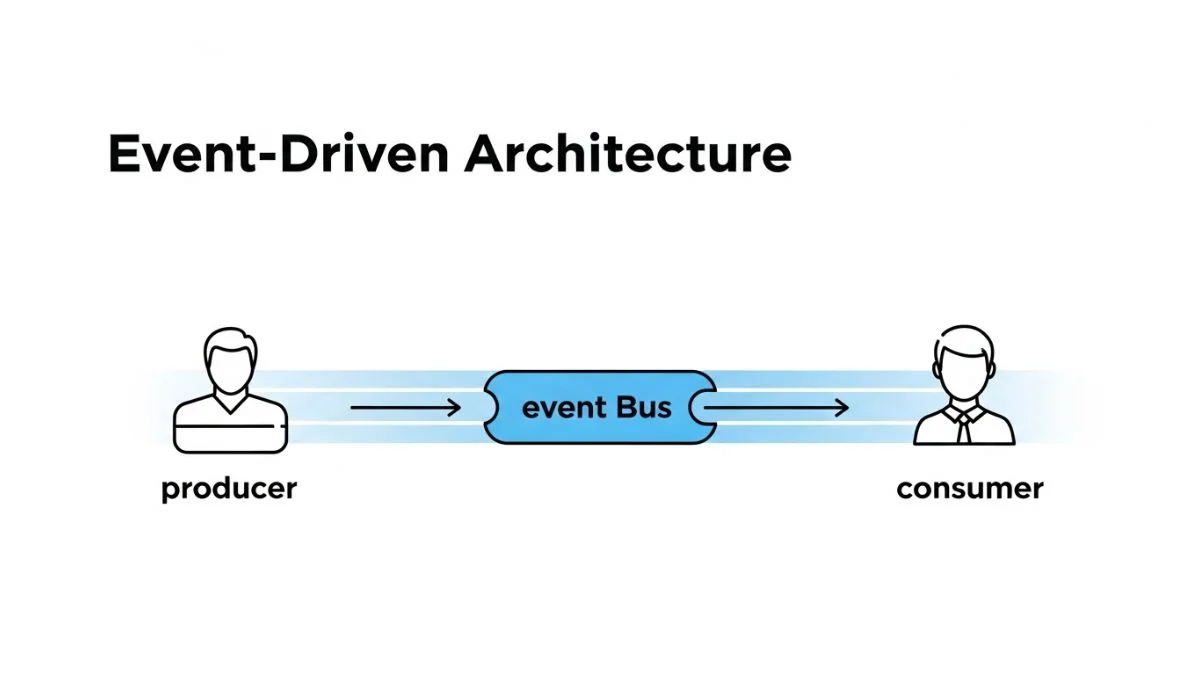
Event-Driven Architecture: Guide for Developers

Event-Driven Architecture: Guide for Developers
Event-driven architecture enables systems to react to changes asynchronously rather than coupling components through synchronous request-response patterns. When a user places an order, instead of the order service directly calling the inventory service, payment service, and notification service, it publishes an OrderCreated event. Each service subscribes to relevant events and reacts independently. This decoupling allows services to scale independently, handle failures gracefully, and add new functionality without modifying existing systems.
This guide covers event-driven architecture from first principles to production implementation. You'll learn when event-driven patterns provide genuine benefits over request-response, how to design event schemas that evolve without breaking consumers, and how to handle the complexity that comes with eventual consistency. The patterns and code examples come from production systems processing millions of events daily.
We'll cover event design, messaging infrastructure, consistency patterns, and debugging strategies that make event-driven systems reliable in production.
Understanding Event-Driven Architecture
In traditional request-response architecture, Component A calls Component B and waits for a response. Component A knows Component B exists and depends on its availability. If Component B is down, Component A fails. If you add Component C that also needs to react when Component A does something, you must modify Component A to call Component C.
Event-driven architecture inverts this relationship. Component A publishes events describing what happened: "OrderCreated", "UserRegistered", "PaymentProcessed". It doesn't know or care who subscribes to these events. Components B and C subscribe to events they care about and react accordingly. Adding Component D requires no changes to A, B, or C — Component D simply subscribes to relevant events.
This decoupling provides three key benefits: services can be added without modifying existing code, services can fail independently without cascading failures, and services can process events at their own pace rather than blocking the publisher. The tradeoff is complexity — debugging event flows is harder than tracing request-response calls, and ensuring data consistency requires careful design.
When Event-Driven Architecture Makes Sense
Event-driven patterns excel when one action triggers multiple independent reactions. User registration triggers email verification, analytics tracking, CRM updates, and welcome email delivery. Implementing this as synchronous calls means the registration endpoint must wait for all operations or handle failures gracefully when the email service is down. Event-driven architecture lets each reaction happen independently and asynchronously.
Systems with unpredictable load benefit from event buffering. If your system receives 1,000 orders in one minute, processing them synchronously might overwhelm the payment service. Publishing events to a queue lets consumers process at sustainable rates. The queue absorbs traffic spikes and consumers catch up during lower traffic periods.
Event-driven architecture also enables real-time features and streaming analytics. Publishing all user actions as events lets you build dashboards that update in real-time, recommendation engines that react to behavior patterns, and fraud detection systems that analyze event streams. These patterns are difficult or impossible with request-response architectures.
Don't use event-driven architecture for operations that need immediate feedback. If a user clicks "Delete Account" and expects immediate confirmation, synchronous request-response works better. Event-driven systems create eventual consistency — the deletion event might take seconds or minutes to process fully. Use events for fire-and-forget operations, not user-facing actions requiring immediate results.
Event Design Principles
Events represent facts about things that happened in the past. They use past-tense naming: OrderCreated, UserRegistered, PaymentProcessed, InventoryUpdated. This distinguishes them from commands (CreateOrder, RegisterUser) which request actions, and queries (GetOrder, FindUser) which retrieve data.
Events should be self-contained, including all data consumers need to process them without making additional requests. An OrderCreated event includes order details (items, prices, quantities), user information (user ID, shipping address), and metadata (timestamp, correlation ID). This prevents consumers from calling back to the order service to fetch additional data, which would create coupling.
Design events for the consumer, not the producer. Consider what data consumers need rather than what data is convenient to include. If five services consume OrderCreated events and four of them need shipping address, include it in the event even if it seems redundant. The goal is decoupling, and forcing consumers to fetch additional data creates coupling.
Event Schema Design
Structure events as JSON objects with consistent top-level fields: event type, version, timestamp, correlation ID, and event data. This standardization makes event processing easier across all consumers.
{
  "eventType": "OrderCreated",
  "eventVersion": "1.0",
  "timestamp": "2026-03-28T10:30:00Z",
  "correlationId": "550e8400-e29b-41d4-a716-446655440000",
  "causationId": "660e8400-e29b-41d4-a716-446655440001",
  "data": {
    "orderId": "ORD-12345",
    "userId": "USR-67890",
    "items": [
      {
        "productId": "PROD-111",
        "name": "Wireless Mouse",
        "quantity": 2,
        "price": 29.99
      }
    ],
    "total": 59.98,
    "currency": "USD",
    "shippingAddress": {
      "street": "123 Main St",
      "city": "Seattle",
      "state": "WA",
      "zip": "98101"
    }
  }
}
The correlation ID tracks related events through the system. When a user places an order, all events triggered by that action (OrderCreated, InventoryReserved, PaymentProcessed, EmailSent) share the same correlation ID. This enables tracing event flows through distributed systems. The causation ID identifies which specific event triggered this event, creating parent-child relationships.
Event Versioning Strategy
Events evolve over time. You need to add fields, deprecate fields, or change data types without breaking existing consumers. Use explicit version numbers and maintain backward compatibility by adding fields rather than removing them.
When OrderCreated v1.0 includes basic order data and you need to add customer loyalty points in v2.0, add a new optional field. Consumers expecting v1.0 ignore the new field. New consumers use v2.0 data. Both versions work simultaneously during the transition period.
// OrderCreated v1.0
{
  "eventType": "OrderCreated",
  "eventVersion": "1.0",
  "data": {
    "orderId": "ORD-12345",
    "userId": "USR-67890",
    "total": 59.98
  }
}

// OrderCreated v2.0 - added loyaltyPoints field
{
  "eventType": "OrderCreated",
  "eventVersion": "2.0",
  "data": {
    "orderId": "ORD-12345",
    "userId": "USR-67890",
    "total": 59.98,
    "loyaltyPoints": 60  // New field, v1 consumers ignore
  }
}
For breaking changes that can't maintain backward compatibility, create a new event type. Instead of changing OrderCreated to be incompatible, create OrderCreatedV2. Publish both event types during migration. Gradually migrate consumers to the new event type. Deprecate the old event type once all consumers have migrated.
Messaging Infrastructure
Event-driven systems need infrastructure to transport events from publishers to subscribers. Three main approaches exist: message queues, event streams, and pub/sub systems. Each has different characteristics and tradeoffs.
Message queues (RabbitMQ, AWS SQS, Azure Queue Storage) provide work distribution. Publishers send messages to queues. Consumers pull messages from queues and acknowledge when processing completes. If a consumer fails, the message returns to the queue for retry. Queues work well for background job processing and rate limiting consumer load.
Event streams (Apache Kafka, AWS Kinesis, Azure Event Hubs) provide ordered, replayable event logs. Publishers append events to streams. Consumers read events in order and track their position in the stream. You can replay events from any point, enabling new consumers to process historical events. Streams work well for event sourcing and analytics.
Pub/sub systems (Redis Pub/Sub, Google Cloud Pub/Sub) provide ephemeral message delivery. Publishers send messages to topics. All active subscribers receive copies. Messages aren't persisted — if no subscribers are listening, the message disappears. Pub/sub works well for real-time notifications and cache invalidation.
Apache Kafka Implementation
Kafka provides the most robust event streaming platform for production systems. It offers high throughput, horizontal scalability, message replay, and strong ordering guarantees within partitions. Most event-driven architectures at scale use Kafka or a Kafka-compatible system.
// Producer: Publishing events to Kafka
const { Kafka } = require('kafkajs');

const kafka = new Kafka({
    clientId: 'order-service',
    brokers: ['kafka1:9092', 'kafka2:9092']
});

const producer = kafka.producer();

async function publishOrderCreated(order) {
    await producer.connect();

    await producer.send({
        topic: 'orders',
        messages: [{
            key: order.id,  // Partition key - same orderId always goes to same partition
            value: JSON.stringify({
                eventType: 'OrderCreated',
                eventVersion: '1.0',
                timestamp: new Date().toISOString(),
                correlationId: order.correlationId,
                data: order
            }),
            headers: {
                'event-type': 'OrderCreated',
                'source': 'order-service'
            }
        }]
    });
}

// Consumer: Subscribing to events
const consumer = kafka.consumer({ groupId: 'notification-service' });

async function startConsumer() {
    await consumer.connect();
    await consumer.subscribe({ topic: 'orders', fromBeginning: false });

    await consumer.run({
        eachMessage: async ({ topic, partition, message }) => {
            const event = JSON.parse(message.value.toString());

            if (event.eventType === 'OrderCreated') {
                await handleOrderCreated(event.data);
            }
        }
    });
}
Message Queue with RabbitMQ
RabbitMQ works well for job queues and when you don't need message replay. It provides flexible routing through exchanges and supports priority queues, dead letter queues, and delayed messages. RabbitMQ is easier to operate than Kafka for smaller systems.
// Publisher: Send message to exchange
const amqp = require('amqplib');

async function publishEvent(eventType, data) {
    const connection = await amqp.connect('amqp://localhost');
    const channel = await connection.createChannel();

    const exchange = 'events';
    await channel.assertExchange(exchange, 'topic', { durable: true });

    const message = JSON.stringify({
        eventType,
        timestamp: new Date().toISOString(),
        data
    });

    channel.publish(
        exchange,
        eventType,  // Routing key
        Buffer.from(message),
        { persistent: true }
    );

    await channel.close();
    await connection.close();
}

// Consumer: Subscribe to specific event types
async function subscribeToEvents() {
    const connection = await amqp.connect('amqp://localhost');
    const channel = await connection.createChannel();

    const exchange = 'events';
    const queue = 'notification-service';

    await channel.assertExchange(exchange, 'topic', { durable: true });
    await channel.assertQueue(queue, { durable: true });

    // Bind queue to receive OrderCreated and UserRegistered events
    await channel.bindQueue(queue, exchange, 'OrderCreated');
    await channel.bindQueue(queue, exchange, 'UserRegistered');

    channel.consume(queue, async (msg) => {
        const event = JSON.parse(msg.content.toString());

        try {
            await processEvent(event);
            channel.ack(msg);  // Acknowledge successful processing
        } catch (error) {
            channel.nack(msg, false, true);  // Requeue on failure
        }
    });
}
Eventual Consistency Patterns
Event-driven systems create eventual consistency — data becomes consistent eventually but not immediately. When an order is created, the order service's database reflects it immediately, but the inventory service might not update stock levels for several milliseconds or seconds. This delay creates challenges for operations that need to see consistent state across services.
Embrace eventual consistency by designing operations to tolerate it. When displaying order status, show "Processing" while events propagate through the system. Update to "Confirmed" once all services have processed their events. Users understand processing delays better than inconsistent data.
Use idempotent event handlers that produce the same result whether events are processed once or multiple times. Message delivery guarantees vary by infrastructure — some provide at-least-once delivery (events might be delivered multiple times), some provide at-most-once delivery (events might be lost). Design handlers assuming events might be duplicated or arrive out of order.
Handling Duplicate Events
Store processed event IDs to detect duplicates. Before processing an event, check if you've already processed an event with that ID. If yes, skip processing. If no, process the event and store its ID. This creates idempotent handlers that safely handle duplicate delivery.
async function handleOrderCreated(event) {
    const eventId = event.correlationId + '-' + event.eventType;

    // Check if we've processed this event before
    const existing = await db.processedEvents.findOne({ eventId });
    if (existing) {
        console.log('Event already processed, skipping:', eventId);
        return;
    }

    // Process the event
    await sendOrderConfirmationEmail(event.data);

    // Record that we've processed it
    await db.processedEvents.create({
        eventId,
        processedAt: new Date(),
        eventType: event.eventType
    });
}
Handling Out-of-Order Events
Events might arrive out of order. You might receive OrderShipped before OrderConfirmed. Design handlers to work regardless of order, or implement sequence numbers and buffer out-of-order events until earlier events arrive.
For operations where order matters, include sequence numbers in events. Consumers buffer events with higher sequence numbers until they've processed all lower numbers. This ensures processing order matches event order at the cost of latency and complexity.
const eventBuffer = new Map();

async function handleOrderEvent(event) {
    const orderId = event.data.orderId;
    const expectedSeq = await getExpectedSequence(orderId);

    if (event.sequenceNumber === expectedSeq) {
        // Expected sequence, process immediately
        await processEvent(event);
        await updateExpectedSequence(orderId, expectedSeq + 1);

        // Check buffer for next sequential events
        await processBufferedEvents(orderId);
    } else if (event.sequenceNumber > expectedSeq) {
        // Future event, buffer it
        eventBuffer.set(event.sequenceNumber, event);
    } else {
        // Old event, ignore (already processed)
        console.log('Ignoring old event');
    }
}

async function processBufferedEvents(orderId) {
    const expectedSeq = await getExpectedSequence(orderId);
    const buffered = eventBuffer.get(expectedSeq);

    if (buffered) {
        await processEvent(buffered);
        eventBuffer.delete(expectedSeq);
        await updateExpectedSequence(orderId, expectedSeq + 1);
        await processBufferedEvents(orderId);  // Recursive check
    }
}
Event Sourcing Pattern
Event sourcing stores all changes to application state as a sequence of events. Instead of storing current state (order status = "shipped"), store the events that led to that state (OrderCreated, OrderPaid, OrderShipped). Current state is derived by replaying events. This provides complete audit history, enables temporal queries ("what was the order status on March 15?"), and allows building new read models from historical events.
Event sourcing pairs naturally with CQRS. The write side stores events. The read side builds projections by replaying events into optimized query models. When you need a new query model, replay historical events to build it without migrating databases.
The tradeoff is complexity. Deriving state from events requires more code than reading current state from a database. Event stores need different database designs than traditional tables. Changing event schemas requires migration strategies. Don't use event sourcing unless you specifically need audit history or temporal queries.
Implementing Event Store
An event store persists events in append-only logs. Events are never updated or deleted. Each aggregate (order, user, account) has its own event stream. You can query all events for a specific aggregate or all events of a specific type.
// Event Store Schema
CREATE TABLE events (
    id SERIAL PRIMARY KEY,
    aggregate_type VARCHAR(50) NOT NULL,
    aggregate_id VARCHAR(100) NOT NULL,
    event_type VARCHAR(100) NOT NULL,
    event_version VARCHAR(10) NOT NULL,
    event_data JSONB NOT NULL,
    sequence_number INTEGER NOT NULL,
    occurred_at TIMESTAMP NOT NULL DEFAULT NOW(),
    correlation_id UUID,
    causation_id UUID,
    UNIQUE(aggregate_type, aggregate_id, sequence_number)
);

CREATE INDEX idx_events_aggregate ON events(aggregate_type, aggregate_id);
CREATE INDEX idx_events_type ON events(event_type);
CREATE INDEX idx_events_correlation ON events(correlation_id);

// Append events to store
async function appendEvent(aggregateType, aggregateId, event) {
    const sequence = await getNextSequence(aggregateType, aggregateId);

    await db.events.create({
        aggregate_type: aggregateType,
        aggregate_id: aggregateId,
        event_type: event.eventType,
        event_version: event.eventVersion,
        event_data: event.data,
        sequence_number: sequence,
        correlation_id: event.correlationId,
        causation_id: event.causationId,
        occurred_at: new Date()
    });

    // Publish event to message bus for consumers
    await eventBus.publish(event);
}

// Reconstruct aggregate state from events
async function getOrderState(orderId) {
    const events = await db.events.find({
        aggregate_type: 'Order',
        aggregate_id: orderId
    }).orderBy('sequence_number');

    // Replay events to rebuild state
    let state = { id: orderId, status: 'NEW', items: [], total: 0 };

    for (const event of events) {
        state = applyEvent(state, event);
    }

    return state;
}

function applyEvent(state, event) {
    switch (event.event_type) {
        case 'OrderCreated':
            return {
                ...state,
                items: event.event_data.items,
                total: event.event_data.total,
                status: 'PENDING'
            };
        case 'OrderPaid':
            return { ...state, status: 'PAID' };
        case 'OrderShipped':
            return { ...state, status: 'SHIPPED' };
        default:
            return state;
    }
}
Building Projections
Projections are read models built from event streams. A projection subscribes to events and maintains a denormalized view optimized for specific queries. The order list projection maintains a table of order summaries for fast list queries. The order analytics projection maintains aggregated metrics.
// Projection: Order Summary List
async function updateOrderSummaryProjection(event) {
    switch (event.eventType) {
        case 'OrderCreated':
            await db.orderSummaries.create({
                order_id: event.data.orderId,
                user_id: event.data.userId,
                total: event.data.total,
                status: 'PENDING',
                created_at: event.timestamp
            });
            break;

        case 'OrderPaid':
            await db.orderSummaries.update(
                { order_id: event.data.orderId },
                { status: 'PAID', paid_at: event.timestamp }
            );
            break;

        case 'OrderShipped':
            await db.orderSummaries.update(
                { order_id: event.data.orderId },
                { status: 'SHIPPED', shipped_at: event.timestamp }
            );
            break;
    }
}

// Fast query using projection
async function getRecentOrders(userId, limit = 10) {
    return db.orderSummaries.find({ user_id: userId })
        .orderBy('created_at', 'desc')
        .limit(limit);
}
When starting with event sourcing, apply it to specific aggregates rather than the entire system. Use event sourcing for order processing where audit history matters. Use traditional CRUD for user profiles where current state is sufficient. This hybrid approach provides event sourcing benefits where needed without forcing complexity everywhere.
Monitoring and Debugging
Debugging event-driven systems requires different tools than request-response systems. Events flow asynchronously through multiple services. An error might occur minutes after the triggering event. Traditional stack traces don't show event flows. You need event tracing, metrics on event processing, and tools to replay events during debugging.
Implement distributed tracing for events using correlation IDs. Every event includes a correlation ID that flows through all subsequent events. When debugging an issue, query all events with that correlation ID to see the complete flow. Tools like Jaeger or Zipkin can visualize event flows when properly instrumented.
Event Flow Visualization
Log all events published and consumed with correlation IDs. Build dashboards that show event flows through the system. When an OrderCreated event is published, log it. When the inventory service consumes it, log consumption. When it publishes InventoryReserved, log that. This creates an audit trail of event propagation.
// Logging events for tracing
async function publishEvent(event) {
    logger.info('Event published', {
        eventType: event.eventType,
        correlationId: event.correlationId,
        timestamp: event.timestamp,
        data: event.data
    });

    await eventBus.publish(event);
}

async function handleEvent(event) {
    logger.info('Event received', {
        eventType: event.eventType,
        correlationId: event.correlationId,
        service: 'notification-service',
        timestamp: new Date().toISOString()
    });

    try {
        await processEvent(event);

        logger.info('Event processed successfully', {
            eventType: event.eventType,
            correlationId: event.correlationId,
            service: 'notification-service'
        });
    } catch (error) {
        logger.error('Event processing failed', {
            eventType: event.eventType,
            correlationId: event.correlationId,
            service: 'notification-service',
            error: error.message,
            stack: error.stack
        });
        throw error;
    }
}
Dead Letter Queues
Some events fail to process due to bugs or data issues. Send failed events to dead letter queues (DLQs) for later investigation. This prevents poison messages from blocking queue processing while preserving failed events for debugging.
Configure maximum retry attempts before sending events to DLQ. After 3 failed processing attempts, move the event to DLQ and continue processing other events. Build admin tools to inspect DLQ contents, fix bugs, and replay events once issues are resolved.
// Dead letter queue handling
async function handleEventWithRetry(event) {
    const maxRetries = 3;
    let retryCount = await getRetryCount(event);

    try {
        await processEvent(event);
        await clearRetryCount(event);
    } catch (error) {
        retryCount++;

        if (retryCount >= maxRetries) {
            // Max retries exceeded, send to DLQ
            await sendToDeadLetterQueue(event, error);
            logger.error('Event sent to DLQ', {
                eventType: event.eventType,
                correlationId: event.correlationId,
                retries: retryCount,
                error: error.message
            });
        } else {
            // Increment retry count and requeue
            await setRetryCount(event, retryCount);
            throw error;  // Let queue infrastructure requeue
        }
    }
}

// Admin tool to replay DLQ events
async function replayDeadLetterEvents(eventType, limit = 100) {
    const events = await db.deadLetterQueue.find({
        event_type: eventType
    }).limit(limit);

    for (const event of events) {
        try {
            await processEvent(event.event_data);
            await db.deadLetterQueue.delete({ id: event.id });
            console.log('Successfully replayed event:', event.id);
        } catch (error) {
            console.error('Replay failed:', event.id, error.message);
        }
    }
}
Performance Considerations
Event-driven systems can process massive event volumes but require attention to throughput and latency. Publishing events should be fast — typically under 10ms. Processing events can take longer but should maintain predictable throughput to prevent queue backlog.
Batch event publishing when possible. Instead of publishing 100 events individually, batch them into one publish operation. Kafka and most message queues support batching. This reduces network overhead and increases throughput by 10-50x for high-volume publishers.
// Batch event publishing
class EventPublisher {
    constructor() {
        this.batchSize = 100;
        this.batchTimeout = 1000;  // 1 second
        this.buffer = [];
        this.timer = null;
    }

    async publish(event) {
        this.buffer.push(event);

        if (this.buffer.length >= this.batchSize) {
            await this.flush();
        } else if (!this.timer) {
            // Start timer to flush after timeout
            this.timer = setTimeout(() => this.flush(), this.batchTimeout);
        }
    }

    async flush() {
        if (this.buffer.length === 0) return;

        const batch = this.buffer.splice(0);
        if (this.timer) {
            clearTimeout(this.timer);
            this.timer = null;
        }

        await producer.send({
            topic: 'events',
            messages: batch.map(event => ({
                key: event.aggregateId,
                value: JSON.stringify(event)
            }))
        });

        logger.info('Flushed event batch', { count: batch.length });
    }
}
Consumer Scaling
Scale event consumers horizontally by adding more instances. Message queues distribute messages across consumer instances. Kafka partitions events by key — all events with the same key go to the same partition, and each partition is consumed by one consumer in a consumer group. This provides ordering guarantees within a key while enabling parallel processing.
Choose partition keys carefully. Using order ID as the partition key ensures all events for one order go to the same consumer in sequence. Using user ID ensures all events for one user go to the same consumer. Random keys enable maximum parallelism but lose ordering guarantees.
| Partition Key | Ordering Guarantee | Parallelism | Use Case |
|---|---|---|---|
| Order ID | All events for one order in sequence | High (orders independent) | Order processing pipeline |
| User ID | All events for one user in sequence | Medium (users independent) | User activity tracking |
| Random/None | No ordering guarantee | Maximum | Analytics, logging |
Testing Event-Driven Systems
Testing event-driven systems requires different strategies than testing synchronous systems. You need to test event publishing, event consumption, and eventual consistency scenarios. Integration tests verify that publishing an event triggers expected consumer behavior.
For unit tests, mock the event bus. Test that services publish correct events when specific actions occur. Test that event handlers process events correctly in isolation. These tests run fast and don't require message queue infrastructure.
// Unit test for event publishing
describe('OrderService', () => {
    it('publishes OrderCreated event when order is created', async () => {
        const mockEventBus = {
            publish: jest.fn()
        };

        const orderService = new OrderService(mockEventBus);
        const order = await orderService.create({
            userId: 'USR-123',
            items: [{ productId: 'PROD-1', quantity: 2 }]
        });

        expect(mockEventBus.publish).toHaveBeenCalledWith(
            expect.objectContaining({
                eventType: 'OrderCreated',
                data: expect.objectContaining({
                    orderId: order.id,
                    userId: 'USR-123'
                })
            })
        );
    });
});

// Unit test for event consumption
describe('NotificationService', () => {
    it('sends email when OrderCreated event is received', async () => {
        const mockEmailService = {
            send: jest.fn()
        };

        const handler = new OrderCreatedHandler(mockEmailService);
        await handler.handle({
            eventType: 'OrderCreated',
            data: {
                orderId: 'ORD-123',
                userId: 'USR-456'
            }
        });

        expect(mockEmailService.send).toHaveBeenCalledWith(
            expect.objectContaining({
                userId: 'USR-456',
                template: 'order-confirmation'
            })
        );
    });
});
Integration Testing
Integration tests verify end-to-end event flows using real message queue infrastructure. Use Docker Compose to run Kafka or RabbitMQ in test environments. Publish events and verify that consumers process them correctly. These tests catch issues that unit tests miss but take longer to run.
// Integration test with real Kafka
describe('Order Processing Flow', () => {
    let kafka, producer, consumer;

    beforeAll(async () => {
        // Start Kafka container
        kafka = await startKafkaContainer();
        producer = kafka.producer();
        consumer = kafka.consumer({ groupId: 'test-group' });
    });

    afterAll(async () => {
        await stopKafkaContainer();
    });

    it('processes order creation end-to-end', async () => {
        const receivedEvents = [];

        // Subscribe to events
        await consumer.subscribe({ topic: 'orders' });
        await consumer.run({
            eachMessage: async ({ message }) => {
                receivedEvents.push(JSON.parse(message.value));
            }
        });

        // Publish OrderCreated event
        await producer.send({
            topic: 'orders',
            messages: [{
                value: JSON.stringify({
                    eventType: 'OrderCreated',
                    data: { orderId: 'TEST-123' }
                })
            }]
        });

        // Wait for processing
        await waitFor(() => receivedEvents.length > 0, 5000);

        expect(receivedEvents).toContainEqual(
            expect.objectContaining({
                eventType: 'OrderCreated',
                data: { orderId: 'TEST-123' }
            })
        );
    });
});
Common Pitfalls and Solutions
The most common failure mode is creating event storms — cascading events that trigger more events in loops. Service A publishes Event1, Service B consumes it and publishes Event2, Service A consumes Event2 and publishes Event1 again. This creates infinite loops that exhaust resources.
Prevent event storms by designing events as facts about completed actions rather than triggers for actions. OrderCreated describes what happened, not a command to create inventory reservations. Include correlation IDs to detect loops — if you receive an event with the same correlation ID you published, stop processing to prevent infinite loops.
Another pitfall is publishing too much data in events. Including entire object graphs (order with all items, each item with full product details, each product with categories and tags) creates huge events that slow processing and increase costs. Publish minimal data consumers need. If consumers need full details, they can fetch them separately or build cached views from previous events.
Netflix processes billions of events daily through their event-driven architecture. Their key learning: treat events as an append-only log of facts, never update or delete events. Build views from events rather than maintaining shared databases. This pattern enabled them to scale to 200+ million subscribers while maintaining system reliability.
Frequently Asked Questions
Should I use events for everything or only specific use cases?
Use events for asynchronous workflows where one action triggers multiple independent reactions, for systems needing audit history, and for integrating services without tight coupling. Use synchronous request-response for operations requiring immediate feedback, for simple CRUD operations, and when strong consistency is required. Most systems benefit from a hybrid approach using both patterns appropriately.
How do I handle schema changes in events?
Add fields rather than removing them to maintain backward compatibility. Use explicit version numbers in events. When breaking changes are necessary, create new event types and publish both during migration. Use schema registries (like Confluent Schema Registry for Kafka) to validate event schemas and enforce compatibility rules.
What happens if event processing fails?
Configure retry policies with exponential backoff. After maximum retries, send events to dead letter queues for investigation. Make event handlers idempotent so retries don't cause duplicate operations. Monitor DLQs and build admin tools to replay events after fixing issues. Accept that some events might fail — design systems to degrade gracefully.
How do I query data across multiple event-sourced aggregates?
Build read models (projections) that denormalize data from multiple event streams. For example, create an "order dashboard" projection that subscribes to order events, user events, and product events, maintaining a denormalized view optimized for dashboard queries. The write side uses event sourcing, the read side uses traditional queries against projections.
Should I use Kafka or RabbitMQ?
Use Kafka for high-throughput event streaming, when you need message replay, for event sourcing implementations, and for analytics on event streams. Use RabbitMQ for traditional work queues, when you need flexible routing patterns, for lower message volumes (under 100K messages/second), and when operational simplicity matters more than throughput. Kafka is harder to operate but scales better.
How do I test eventual consistency scenarios?
Write integration tests that verify eventual consistency by polling for expected state changes. Publish an event, wait for processing (with timeout), verify expected database state. Use test helpers that wait for conditions with exponential backoff. Accept that these tests are slower than unit tests but necessary for validating async workflows.
What's the performance overhead of event-driven architecture?
Event publishing adds 1-10ms latency depending on infrastructure. Event processing happens asynchronously so doesn't affect request latency. Kafka can handle millions of events per second per broker. RabbitMQ handles tens of thousands per second. The bottleneck is usually event processing logic, not infrastructure. Design consumers to process events efficiently.
How do I debug event flows in production?
Use correlation IDs to trace events through the system. Implement structured logging that includes correlation IDs, event types, and timestamps. Use distributed tracing tools like Jaeger to visualize event flows. Build dashboards showing event processing rates, error rates, and consumer lag. Create admin tools to search events by correlation ID and replay specific event sequences.
Conclusion
Event-driven architecture enables loosely coupled, scalable systems through asynchronous event propagation. Design events as immutable facts with self-contained data. Choose messaging infrastructure based on requirements: Kafka for high-throughput streaming, RabbitMQ for work queues, pub/sub for real-time notifications. Embrace eventual consistency and implement idempotent event handlers. Use correlation IDs for tracing, dead letter queues for failures, and projections for queries.
Start with events for clear asynchronous workflows like notifications and background processing. Add event sourcing only when audit history or temporal queries provide concrete value. Monitor event flows, test eventual consistency scenarios, and build operational tools for debugging and event replay. Event-driven architecture adds complexity but enables scalability and flexibility impossible with synchronous request-response patterns.